
logging
Install this demo on an existing Kubernetes cluster:
$ stackablectl demo install logging -n loggingSystem requirements
To run this demo, your system needs at least:
-
6.5 cpu units (core/hyperthread)
-
5GiB memory
-
27GiB disk storage
Overview
This demo will
-
Install the required Stackable operators.
-
Spin up the following data products:
-
Apache ZooKeeper: A centralized service for maintaining configuration information, naming, providing distributed synchronization, and providing group services. This demo makes its log data observable in OpenSearch Dashboards.
-
Vector: A tool for building observability pipelines. This demo uses Vector as a log agent to gather and transform the logs and as an aggregator to forward the collected logs to OpenSearch.
-
OpenSearch: A data store and search engine. This demo uses it to store and index the log data.
-
OpenSearch Dashboards: A visualization and user interface. This demo uses it to make the log data easily accessible to the user.
-
-
Create an index template and an Index State Management (ISM) policy in OpenSearch so that the log data are stored in a data stream which is rolled over and deleted automatically.
-
Create an index pattern and a view in OpenSearch Dashboards to conveniently browse the log data.
You can see the deployed products and their relationship in the following diagram:
List the deployed Stackable services
To list the installed Stackable services run the following command:
$ stackablectl stacklet list -n logging
┌───────────────────────┬───────────────────────┬───────────┬────────────────────────────────────────────────────────────────────────────────────┬─────────────────────────────────┐
│ PRODUCT               ┆ NAME                  ┆ NAMESPACE ┆ ENDPOINTS                                                                          ┆ CONDITIONS                      │
╞═══════════════════════╪═══════════════════════╪═══════════╪════════════════════════════════════════════════════════════════════════════════════╪═════════════════════════════════╡
│ opensearch            ┆ opensearch            ┆ logging   ┆ -http               http://opensearch.logging.svc.cluster.local:9200               ┆ Available, Reconciling, Running │
│                       ┆                       ┆           ┆ nodes-default-http  http://opensearch-nodes-default.logging.svc.cluster.local:9200 ┆                                 │
├╌╌╌╌╌╌╌╌╌╌╌╌╌╌╌╌╌╌╌╌╌╌╌┼╌╌╌╌╌╌╌╌╌╌╌╌╌╌╌╌╌╌╌╌╌╌╌┼╌╌╌╌╌╌╌╌╌╌╌┼╌╌╌╌╌╌╌╌╌╌╌╌╌╌╌╌╌╌╌╌╌╌╌╌╌╌╌╌╌╌╌╌╌╌╌╌╌╌╌╌╌╌╌╌╌╌╌╌╌╌╌╌╌╌╌╌╌╌╌╌╌╌╌╌╌╌╌╌╌╌╌╌╌╌╌╌╌╌╌╌╌╌╌╌┼╌╌╌╌╌╌╌╌╌╌╌╌╌╌╌╌╌╌╌╌╌╌╌╌╌╌╌╌╌╌╌╌╌┤
│ zookeeper             ┆ simple-zk             ┆ logging   ┆ server-zk           simple-zk-server.logging.svc.cluster.local:2282                ┆ Available, Reconciling, Running │
├╌╌╌╌╌╌╌╌╌╌╌╌╌╌╌╌╌╌╌╌╌╌╌┼╌╌╌╌╌╌╌╌╌╌╌╌╌╌╌╌╌╌╌╌╌╌╌┼╌╌╌╌╌╌╌╌╌╌╌┼╌╌╌╌╌╌╌╌╌╌╌╌╌╌╌╌╌╌╌╌╌╌╌╌╌╌╌╌╌╌╌╌╌╌╌╌╌╌╌╌╌╌╌╌╌╌╌╌╌╌╌╌╌╌╌╌╌╌╌╌╌╌╌╌╌╌╌╌╌╌╌╌╌╌╌╌╌╌╌╌╌╌╌╌┼╌╌╌╌╌╌╌╌╌╌╌╌╌╌╌╌╌╌╌╌╌╌╌╌╌╌╌╌╌╌╌╌╌┤
│ opensearch-dashboards ┆ opensearch-dashboards ┆ logging   ┆ http                http://10.104.213.49:31655                                     ┆                                 │
│                       ┆                       ┆           ┆ metrics             10.104.213.49:30865                                            ┆                                 │
└───────────────────────┴───────────────────────┴───────────┴────────────────────────────────────────────────────────────────────────────────────┴─────────────────────────────────┘|
When a product instance has not finished starting yet, the service will have no endpoint. Depending on your internet connectivity, creating all the product instances might take considerable time. A warning might be shown if the product is not ready yet. |
Inspect the log data
You can have a look at the log data within the OpenSearch Dashboards web interface by running stackablectl stacklet list -n logging and opening the HTTP URL in the opensearch-dashboards entry’s ENDPOINTS column.
In this case, it is http://10.104.213.49:31655.
Log in with the username admin and password adminadmin.
|
On first login, you will be presented with some options. Feel free to bypass them to get to the logs. |
OpenSearch Dashboards opens the view Logs which shows the most interesting fields of the recent log data. If you do not see anything, increase the search window to greater than Last 15 minutes.
|
If you click Discover in the menu on the left, then a new search is started instead. Open the view Logs again with Open in the upper right corner. |
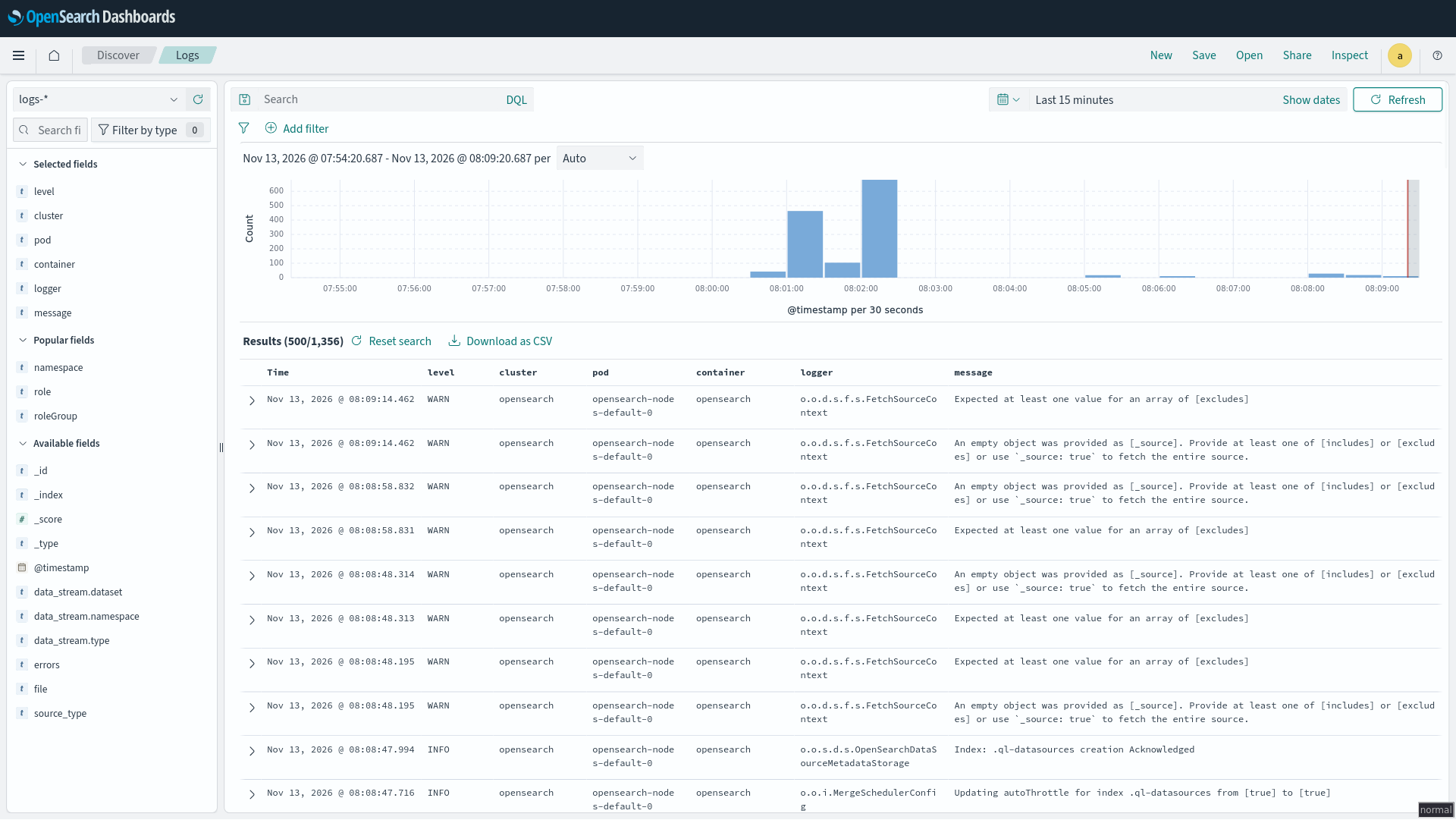
From here you can inspect the logs. You can select fields on the left side to limit the view to interesting information.
Log data stream
Vector writes all log data into the single data stream logs-generic-default.
The data stream is created on the first write because the index template logs matches its name and contains a data_stream section.
The ISM policy logs rolls the backing indices of the data stream over once a day and deletes them after a week.